What are overages?
Overages is a setting that paid subscribers of TinyURL can opt into to exceed some of their plans’ monthly limits for a fee.
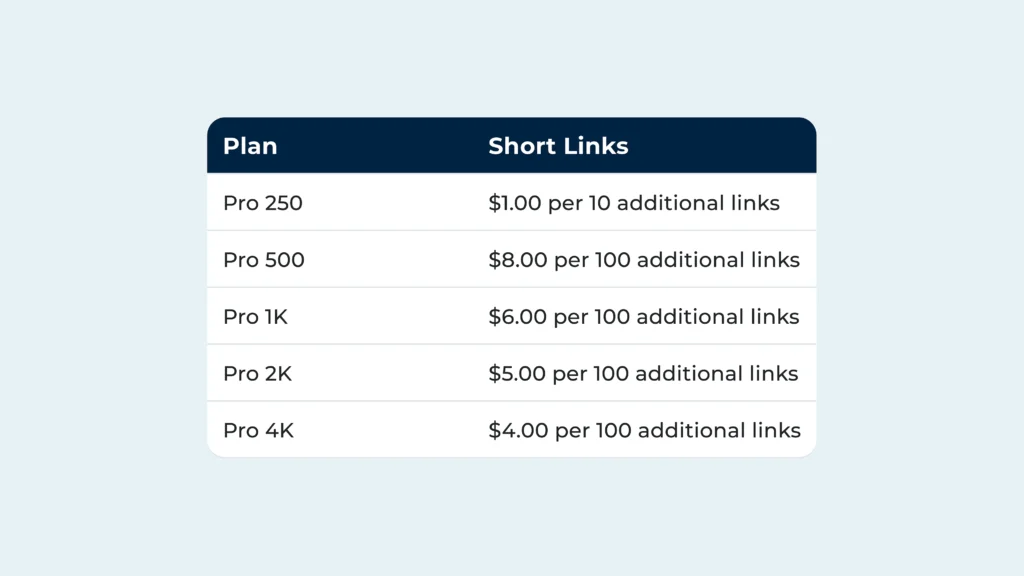
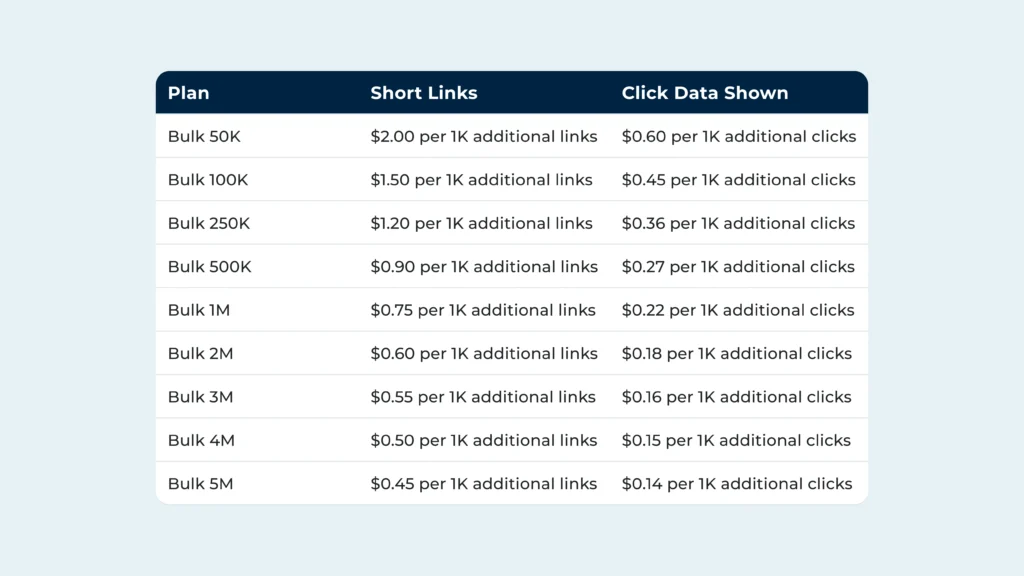
With overages enabled, you can shorten more links and view more click data than your monthly limits allow, for an extra charge that’ll be billed every month on the date you subscribed to your plan. The table below breaks our overage rates down according to your plan type. Note that the values printed below exclude any applicable taxes.
Usage and Billing Periods
An important concept to know in order to understand overages is the difference between the usage period and billing period.
The usage period is the period that defines monthly limits. Every month, we refresh how many links you can shorten and clicks you can track before being cut off. This typically happens every month on the date you subscribed to your plan (ex. the 26th of every month if you subscribed on the 26th), or the last day of the month in months that have fewer days in the month than your refresh date (ex. the 30th of months that end in 30 if you subscribed on the 31st).
The billing period is the period that defines when you’re billed for your subscription. If you’re an annual user, your subscription will be billed annually on the date that you subscribed. If you’re a monthly user, then your billing period is effectively the same as your usage period.
Link Shortening Overages
You can think of enabling overages as removing the limit on your links per month. At the end of your usage period, our system calculates a one-time overage charge based on the number of links you created beyond your limit. All one-time overage charges will be billed at the end of the usage period when they were incurred.
Let’s say you’re an annual subscriber to Pro 250 who joined up on December 28th, 2025. You’ve enabled overages, and shortened a total of 266 links during the usage period ending on January 28th, 2026. This means that you’ll be charged $2.00 (before taxes) for those additional links on January 28th, 2026.
The expanded limit you get when you incur overage charges will not roll over into the following month. This means that if you incur an overage charge for an extra 100 links, for example, then you should make sure you consume all of those extra hundred links before your limits refresh.
Click Data Overages
For users on our Bulk plans, click data overages work a little differently since Bulk plans come with a limit on clicks reported.
Every click your links earn during a given usage period will count toward your monthly click data allowance. This is true for all your links — not just the ones created within the given usage period.
At the end of your usage period, our system calculates an overage charge based on the total number of clicks all your links earned within that usage period.
Click data overages are always on, and cannot be disabled. This is consistent with the primary use case for Bulk plans: creating large volumes of links, which are expected to receive an average of one click per link (you can think of it as an open rate of no higher than 100%).
For more detailed tips, check out our article on managing overages as a Bulk user.
Who can use overages with TinyURL?
In order to benefit from overages with TinyURL, you need to be an existing paid customer in good standing (i.e. not behind on renewal payments).
All Bulk plan subscribers are eligible to use overages.
Pro plan subscribers who subscribed before November 18th, 2025 cannot use overages. You can see if the plan you’re subscribed to is eligible for overages by visiting Settings > Subscription while logged into your TinyURL account. Ineligible plans have a badge labeled ‘Legacy’ next to the plan name, near the top of the page.
If you’re on a legacy plan but want to work with overages, you can simply switch over to any TinyURL plan that matches your usage needs.
How do you enable overages with TinyURL?
Enabling link overages is simple: visit Settings > Account Usage while logged into your TinyURL account, and find the ‘Overages’ toggle on the widget displaying your ‘Links’ limit.
For users on Bulk plans, overages for tracked clicks are on by default and cannot be disabled.
How much are TinyURL’s overage rates?
Overage charges at TinyURL scale depending on the plan you’re subscribed to. See the table printed near the top of this article for a summary.