Yes, you can change where a TinyURL link redirects to—but only under certain conditions. This article walks you through what’s required and how to do it, step by step.
Before You Start: Two Things to Check
- The link must be under your registered account. You can only edit a link that was created while you were signed in to your TinyURL account. If the link isn’t in your account yet, you can add it by following our guide here: https://helpdesk.tinyurl.com/faqs/import-tinyurls-into-my-account
- You’ll need a paid plan. Editing the destination URL is a premium feature. To unlock it, upgrade to one of our paid plans, such as the Pro-250 plan.
Tip: Make sure the link is confirmed under your account before you upgrade, so you don’t pay for a plan and then find the link isn’t editable.
How to Edit a TinyURL Link’s Destination
Once your account is upgraded, here’s how to point an existing link to a new web address:
Step 1: Select the link
After upgrading:
- Log in to your TinyURL account.
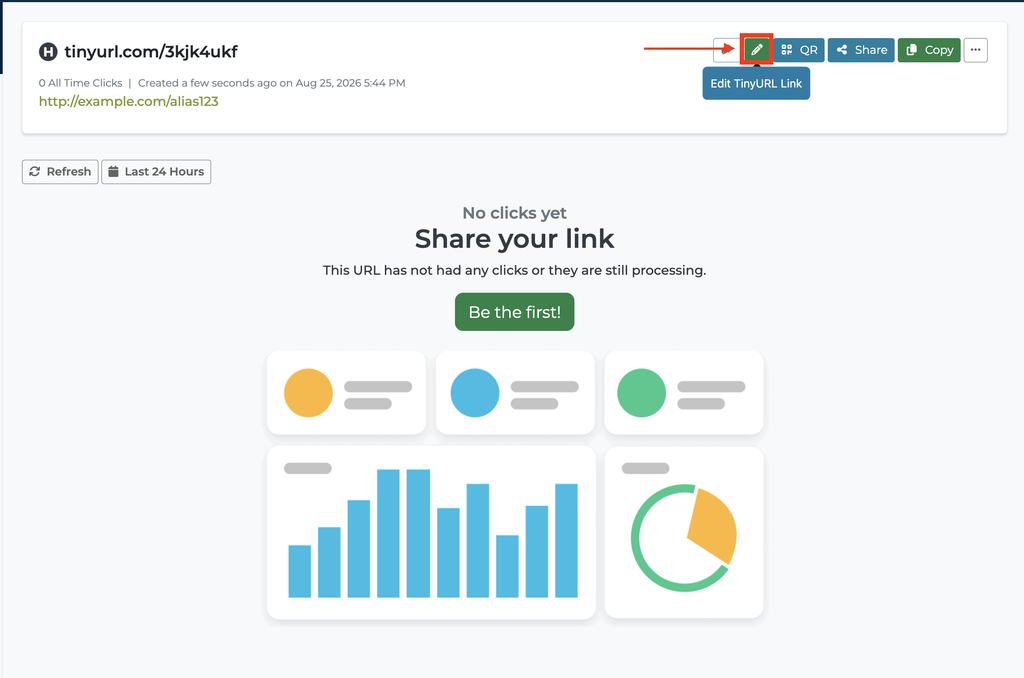
- From the left side of your dashboard, select the TinyURL you’d like to edit.
- Click the Edit (pencil) icon.
Step 2: Update the Destination URL
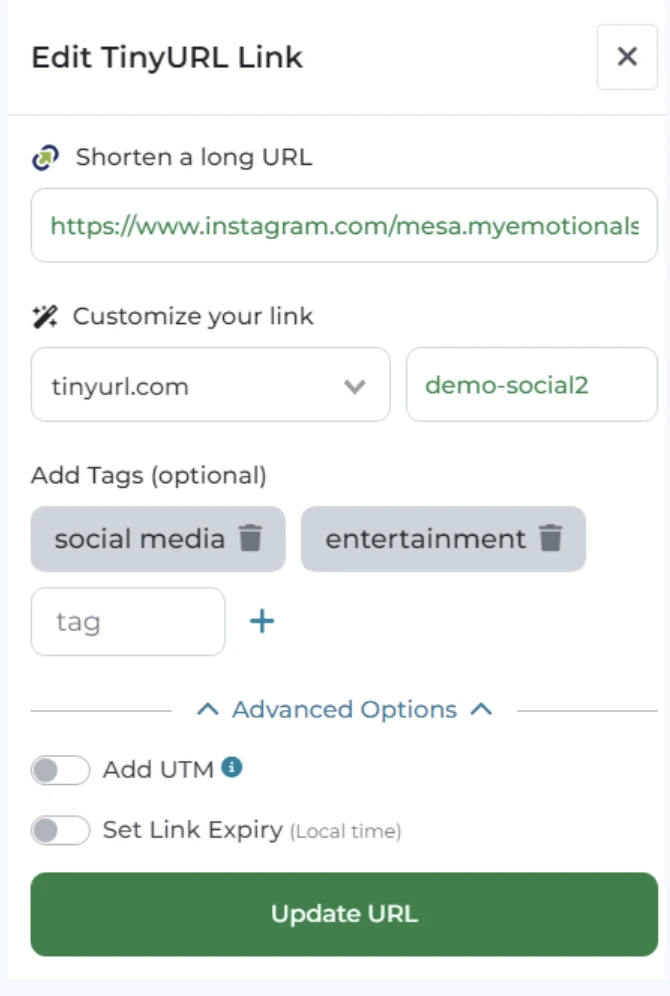
- The Edit TinyURL Link panel will open.
- Simply replace the existing destination URL with your new website URL and save your changes by clicking Update URL.
- Your existing TinyURL will remain the same, and any associated QR code will automatically redirect to the updated destination.
Frequently Asked Questions
Why can’t TinyURL Support edit my link for me?
- For security and privacy reasons, our system is designed so that only the person who created a link can modify or delete it. This protects link owners from having their links changed without permission. Because of this, our support team is unable to edit or delete links on your behalf.
- Because of this, our support team is unable to update or delete links on your behalf.
What if my TinyURL isn’t under my account?
- If your TinyURL isn’t associated with your account, you’ll first need to import it before you can manage or edit it.
- If the TinyURL was created as a guest (without signing in), it’s temporarily stored in that user’s browser session. Those guest links are automatically imported into an account when the same user signs in or creates a TinyURL account using the same browser session.
If that browser session has been cleared, expired, or is no longer available, the link cannot be imported or modified. Since we can no longer verify who originally created the TinyURL, we’re unable to make changes to it. This is an important security measure that helps prevent unauthorized users from taking control of or modifying someone else’s links.
- You can learn more here:
https://helpdesk.tinyurl.com/faqs/import-tinyurls-into-my-account
Quick Summary:
| Requirement | Why It Matters |
|---|---|
| Link is under your registered account | You can only edit links you own |
| Paid plan (e.g., Pro-250) | Editing and deleting are premium features |